WordPress AI integration stopped being a plugin-only affair with the release of WordPress 7.0 in May 2026. Core now ships with a standardized way for plugins, themes, and external AI agents to talk to your site — not a built-in AI writer bolted onto the editor, but genuine infrastructure: the Abilities API, the WP AI Client, and a central Connectors screen for managing AI provider credentials. This guide covers what actually shipped, how to register your own Ability, and the security considerations that come with exposing parts of your site to an AI agent.
What Shipped in WordPress 7.0’s AI Layer
Three pieces work together, and it’s worth being precise about what each one does:
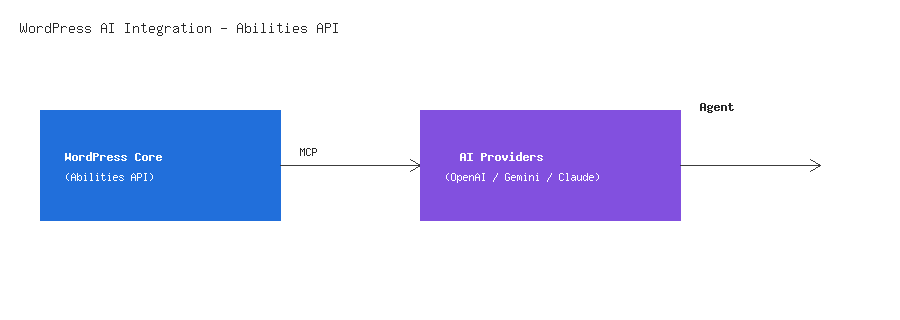
- The Abilities API (introduced server-side in WordPress 6.9, with a client-side JavaScript counterpart added in 7.0) — a standardized interface plugins use to register discrete, permission-checked capabilities like
create_post,moderate_comments, orinstall_plugin. - The WP AI Client — a provider-agnostic PHP SDK built into core. Plugins can request a capability (summarize text, adjust tone, generate an image) without writing their own integration against OpenAI, Gemini, or Anthropic’s individual APIs. WordPress handles the connection and credential management centrally.
- The Connectors screen (Settings > Connectors) — where a site owner authenticates AI providers once, with an API key shared across every compatible plugin on the site, instead of pasting the same key into ten different plugin settings pages.
An MCP Adapter sits alongside all of this, translating registered Abilities into the Model Context Protocol — the same open standard that lets external AI agents (not just providers you’ve connected inside wp-admin) discover and call a site’s registered capabilities in a structured way, with the same permission checks applying regardless of who’s calling.
Why This Matters More Than Another AI Plugin
WordPress already had AI-assisted writing tools before 7.0 — Rank Math and Yoast both ship AI-assisted titles and meta descriptions, Jetpack has an AI Assistant, and dozens of standalone content-generation plugins exist. What was missing was a shared foundation: every one of those plugins built its own integration against whichever AI provider it chose, with its own credential storage and its own permission model. The Abilities API gives the whole plugin ecosystem a common target to build against, the same way custom post types gave every plugin a common way to extend content types instead of inventing their own.
Registering a Custom Ability
If you maintain a plugin, registering an Ability follows a pattern that should look familiar — it deliberately mirrors how custom REST API endpoints are registered, right down to requiring an explicit permission callback:
add_action( 'abilities_api_init', 'wpwebguru_register_abilities' );
function wpwebguru_register_abilities() {
    wp_register_ability( 'wpwebguru/summarize-post', array(
        'label'               => __( 'Summarize Post', 'wpwebguru' ),
        'description'         => __( 'Generates a short summary of a post using the site's connected AI provider.', 'wpwebguru' ),
        'input_schema'        => array(
            'type'       => 'object',
            'properties' => array(
                'post_id' => array( 'type' => 'integer' ),
            ),
            'required'   => array( 'post_id' ),
        ),
        'execute_callback'    => 'wpwebguru_summarize_post_callback',
        'permission_callback' => function ( $input ) {
            return current_user_can( 'edit_post', $input['post_id'] );
        },
    ) );
}
Note: The permission_callback here is not optional boilerplate, exactly like the equivalent parameter on register_rest_route(). An Ability with no permission check, or one that returns true unconditionally, is reachable by any AI agent or plugin that discovers it through the MCP Adapter — treat this the same way you’d treat a public-facing REST endpoint, because functionally, that’s what it is.
Calling an AI Model with the WP AI Client
Inside the execute_callback above, the actual AI call goes through the WP AI Client rather than a provider-specific SDK, so the same code keeps working regardless of which provider the site owner has connected under Settings > Connectors:
function wpwebguru_summarize_post_callback( $input ) {
    $post = get_post( $input['post_id'] );
    if ( ! $post ) {
        return new WP_Error( 'not_found', 'Post not found.' );
    }

    $client = wp_ai_client();

    $response = $client->generate_text( array(
        'prompt' => 'Summarize the following post content in two sentences: ' . wp_strip_all_tags( $post->post_content ),
    ) );

    return array( 'summary' => $response->get_text() );
}
Warning: Whatever content you pass to generate_text() (or any WP AI Client method) leaves your server and goes to whichever third-party provider the site owner has connected — OpenAI, Gemini, or Anthropic by default, though the provider list is extensible. Never pass unsanitized user input, private user meta, or anything sensitive directly into a prompt without thinking through what a third-party AI provider seeing that data actually means for your site’s privacy policy and, depending on your audience, your regulatory obligations.
Security Considerations for Site Owners
A few things worth checking once your site is on 7.0, whether or not you write any of your own Abilities code:
- Audit which plugins have registered Abilities and what permission level each one requires — the same way you’d periodically review which plugins have admin-level REST API access.
- Treat API keys under Settings > Connectors like any other credential covered in our WordPress security checklist — restrict who can access that settings screen, since a shared key there is usable by every compatible plugin on the site.
- Understand the MCP Adapter’s reach. An Ability registered with a permissive permission callback isn’t just reachable by AI providers you’ve explicitly connected — the MCP protocol is designed for external agents to discover and call site capabilities, so the same scrutiny that applies to a public REST endpoint applies here.
- Review AI-generated content before it publishes. None of this infrastructure changes the basic rule that AI output needs human review before it goes live — the Abilities API makes it easier to wire AI into a workflow, not a reason to skip the review step.
What’s Coming Next
The WordPress AI Team’s roadmap beyond 7.0 includes a Workflows API for chaining multiple Abilities together into a single automated sequence — think "summarize this post, generate a featured image, then queue it for review" as one registered workflow rather than three separate manual steps — along with deeper integration with WordPress’s real-time collaborative editing, also new in 7.0. The core team has been explicit that the goal isn’t adding AI buttons everywhere in the UI, but building infrastructure the plugin ecosystem can extend consistently, the same pattern WordPress has followed with every major API addition since custom post types.
Should You Build Against This Now?
If you maintain a plugin with capabilities that would genuinely benefit from AI assistance or automation — content workflows, moderation, data lookups — registering Abilities now means your plugin fits naturally into whatever a site owner has already connected, rather than requiring yet another provider-specific integration. If you’re building a headless WordPress setup, the same MCP-based discovery mechanism is worth understanding even if you’re not registering Abilities yourself, since it’s the same underlying pattern external tooling will increasingly expect a WordPress site to expose.
Wrapping Up
WordPress 7.0’s AI layer is genuinely different from the AI-assisted plugins that came before it — it’s a shared, permission-checked foundation rather than another isolated integration. Whether you’re registering your own Abilities or just running a site with AI-connected plugins installed, the same fundamentals apply as everywhere else in WordPress: explicit permission checks, careful handling of what data leaves your server, and human review before anything AI-generated goes live.