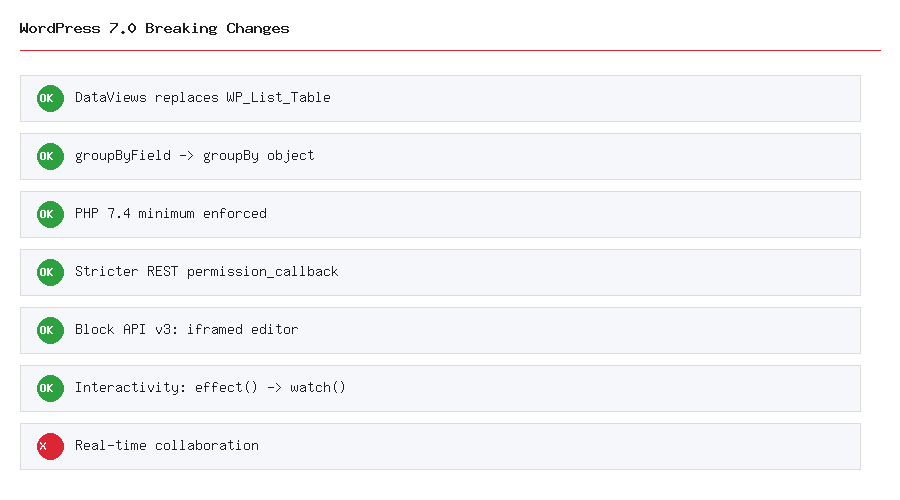
WordPress 7.0 breaking changes caught a lot of developers off guard — not because the release was poorly documented, but because most of the pre-release coverage was written before May 8, 2026, when the project’s own headline feature got pulled twelve days before launch. This guide covers what actually shipped in the final release, the concrete API changes that can break a plugin or theme silently, and a practical checklist for auditing your stack before you update production.
First, Clearing Up the Real-Time Collaboration Confusion
If you read anything about WordPress 7.0 before its May 20 release, there’s a good chance it described real-time, Google-Docs-style collaborative editing as a headline feature. It didn’t ship. On May 8, 2026, the core team removed real-time collaboration from the 7.0 milestone entirely, citing concerns around race conditions, server load, memory efficiency, and bugs that kept surfacing through fuzz testing. It remains an active project and is expected in a future release, but WordPress 7.0 itself still uses the standard post-locking behavior WordPress has always used — wp_check_post_lock() and friends work exactly as before. What did ship instead is the Notes system (block-level comments, introduced in 6.9) gaining email notifications and a Suggestions mode, which is the actual collaboration story in this release.
What Actually Shipped
Setting the collaboration confusion aside, 7.0 is still a genuinely large release:
- AI infrastructure in core — the WP AI Client, Abilities API, and a Connectors screen for managing provider credentials. Covered in detail in our WordPress AI integration guide.
- DataViews — a React-based interface replacing the old server-rendered
WP_List_Tablescreens for Posts, Pages, and Media. - A refreshed admin UI — the first meaningful visual overhaul of wp-admin since 2013.
- Visual Revisions — an inline visual comparison replacing the old text-diff revision screen.
- PHP 7.4 as the new minimum — PHP 7.2 and 7.3 support has been dropped; sites on those versions stay on the 6.9 branch and won’t receive the 7.0 update.
Breaking Change #1: DataViews Replaces WP_List_Table (Core Screens Only)
The Posts, Pages, and Media admin screens now render through DataViews instead of the legacy PHP WP_List_Table class. This only affects the three core screens — custom post type list screens are not converted in 7.0 and continue using WP_List_Table exactly as before, so your existing manage_{post_type}_posts_columns customizations on a custom post type are unaffected for now.
Warning: If you have JavaScript that reads or manipulates the Posts/Pages/Media table DOM directly — scraping row data, targeting specific <tr> elements by ID, or hooking bulk actions through the old markup — that code will break. DataViews renders a completely different DOM structure. If your plugin adds custom columns to these three specific screens via manage_posts_custom_column, note that column-related hooks aren’t fully integrated with DataViews yet in 7.0; test this specifically before updating a production site with such a plugin active.
Breaking Change #2: groupByField Is Now a groupBy Object
If your plugin customizes a DataViews-powered screen’s view configuration, the grouping API changed shape entirely — not just renamed, but restructured from a plain string to an object:
// Before (WordPress 6.9)
const view = { groupByField: 'status' };

// After (WordPress 7.0)
const view = {
    groupBy: {
        field: 'status',
        direction: 'asc',
        showLabel: true,
    },
};
Note: This is a frontend-only, JavaScript-side change — nothing to do with PHP. If a plugin’s DataViews customization still uses the old groupByField string, the grouping simply stops working rather than throwing a hard error in most cases, which makes it an easy regression to miss without explicit testing on a Posts/Pages/Media screen where your plugin customizes the view.
Breaking Change #3: Stricter REST API Permission Enforcement
This one connects directly to a mistake covered in our custom REST API endpoint guide: a missing permission_callback on a registered route already triggered a deprecation notice in recent WordPress versions, but 7.0 enforces this more strictly. Leave it out now and WordPress throws a doing_it_wrong notice and is likely to block the request outright rather than silently defaulting to public access.
// Public endpoint: be explicit about it
'permission_callback' => '__return_true',

// Private endpoint: check a real capability
'permission_callback' => function ( $request ) {
    return current_user_can( 'edit_posts' );
},
If you maintain any custom endpoints, audit every register_rest_route() call in your codebase for a missing or ambiguous permission_callback before updating — this is a quick grep and one of the highest-value five minutes you can spend preparing for 7.0.
Breaking Change #4: The Iframed Editor Is Now Enforced (Block API v3)
Blocks registered with apiVersion: 3 now run inside an iframed editor by default, sandboxing the editing canvas from the rest of wp-admin. If your custom block’s JavaScript reaches outside its own boundary — referencing the top-level document or window object directly, rather than the editor’s own scoped context — that reference will likely break, since it’s now operating inside a different document context than it was written to assume. Review any custom block whose edit() function does DOM manipulation outside standard React patterns before updating.
Breaking Change #5: Interactivity API’s effect() Is Now watch()
If you’ve built anything with the Interactivity API (introduced for front-end block interactivity without a full JavaScript framework), the reactive primitive has been renamed and expanded:
// Before
effect(() => { /* ... */ });

// After — same idea, new name, plus store-level subscriptions
watch(() => { /* ... */ });
The new watch() primitive also supports subscribing to reactive state changes at the store level independent of DOM updates — useful for analytics instrumentation or tracking client-side navigation without tying the logic to a specific rendered element.
A Quick Pre-Update Checklist
- Confirm your hosting environment runs PHP 7.4 or newer — ideally PHP 8.3+, which is now the recommended (not just minimum) target.
- Grep your codebase for
register_rest_route()calls missing apermission_callback. - If any plugin customizes the Posts, Pages, or Media admin screens via JavaScript DOM manipulation, test it specifically on a 7.0 staging environment — this is the highest-risk category of plugin for silent breakage.
- Search for
groupByFieldin any custom DataViews configuration your plugin registers. - If you use the Interactivity API, replace
effect()calls withwatch(). - Test custom blocks with DOM manipulation outside the standard block edit pattern under the now-enforced iframed editor.
Wrapping Up
The realistic risk with WordPress 7.0 isn’t core itself breaking — it’s a plugin or theme breaking silently because it assumed an API surface that changed shape. Test on a staging environment with your actual plugin stack before touching production, pay particular attention if you maintain any Posts/Pages/Media screen customizations or custom REST endpoints, and don’t believe every pre-May-8 article’s description of what "ships" in this release without checking the date it was written.