Register a custom Ability in WordPress 7.0 by following this tutorial from scratch — the core system introduced in 6.9 and expanded in 7.0 that lets plugins expose discrete, permission-checked capabilities to AI agents, automation tools, and other plugins. If you’ve read our overview of WordPress AI integration in 2026, this is the hands-on follow-up: we’ll build two real, working Abilities step by step, test them, and cover the mistakes that trip people up.
What We’re Building
Two Abilities, covering the two shapes most real-world Abilities take:
- A read-only Ability that returns a post’s word count and estimated reading time — safe to expose broadly since it only reads data.
- A write Ability that updates a post’s status — needs a stricter permission check since it modifies data.
Step 1: Set Up the Registration Hook
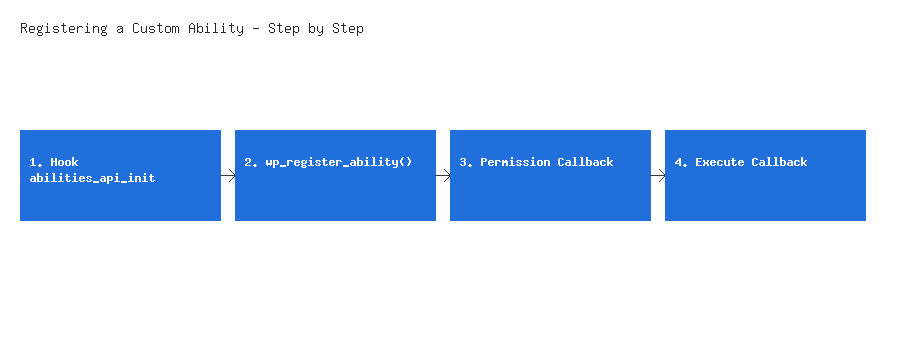
Abilities register on the abilities_api_init hook, not the general init hook — this ensures the Abilities API itself has finished loading before your code tries to use it. Add this to your plugin’s main file or your theme’s functions.php:
add_action( 'abilities_api_init', 'wpwebguru_register_abilities' );
function wpwebguru_register_abilities() {
    // Our Abilities will go here
}
Step 2: Register the Read-Only Ability
Every Ability needs a unique, namespaced name, a label, a description (this is what an AI agent actually reads to decide when to use it — be specific), an input schema, an execute callback, and a permission callback.
function wpwebguru_register_abilities() {
    wp_register_ability( 'wpwebguru/post-reading-time', array(
        'label'               => __( 'Get Post Reading Time', 'wpwebguru' ),
        'description'         => __( 'Returns the word count and estimated reading time for a given post ID.', 'wpwebguru' ),
        'input_schema'        => array(
            'type'       => 'object',
            'properties' => array(
                'post_id' => array(
                    'type'        => 'integer',
                    'description' => __( 'The ID of the post to analyze.', 'wpwebguru' ),
                ),
            ),
            'required'   => array( 'post_id' ),
        ),
        'output_schema'       => array(
            'type'       => 'object',
            'properties' => array(
                'word_count'    => array( 'type' => 'integer' ),
                'reading_time'  => array( 'type' => 'string' ),
            ),
        ),
        'execute_callback'    => 'wpwebguru_get_reading_time',
        'permission_callback' => function ( $input ) {
            return current_user_can( 'read_post', $input['post_id'] );
        },
    ) );
}

function wpwebguru_get_reading_time( $input ) {
    $post = get_post( $input['post_id'] );

    if ( ! $post ) {
        return new WP_Error( 'post_not_found', __( 'No post exists with that ID.', 'wpwebguru' ) );
    }

    $word_count = str_word_count( wp_strip_all_tags( $post->post_content ) );
    $minutes    = max( 1, (int) round( $word_count / 200 ) ); // ~200 words per minute

    return array(
        'word_count'   => $word_count,
        'reading_time' => sprintf( _n( '%d minute', '%d minutes', $minutes, 'wpwebguru' ), $minutes ),
    );
}
Note: The output_schema is optional but worth including — it tells any calling agent or tool exactly what shape of data to expect back, the same way a REST API response schema does. Skipping it still works, but callers are left guessing at the response structure.
Step 3: Register the Write Ability (Stricter Permission Check)
An Ability that changes data needs a permission check that actually matches the risk — read_post was fine for reading; updating a post’s status needs edit_post at minimum, and you may want to restrict which status transitions are even allowed.
function wpwebguru_register_abilities() {
    // ... previous Ability registration ...

    wp_register_ability( 'wpwebguru/update-post-status', array(
        'label'               => __( 'Update Post Status', 'wpwebguru' ),
        'description'         => __( 'Changes a post's status, e.g. from draft to pending review.', 'wpwebguru' ),
        'input_schema'        => array(
            'type'       => 'object',
            'properties' => array(
                'post_id' => array( 'type' => 'integer' ),
                'status'  => array(
                    'type' => 'string',
                    'enum' => array( 'draft', 'pending', 'publish' ),
                ),
            ),
            'required'   => array( 'post_id', 'status' ),
        ),
        'execute_callback'    => 'wpwebguru_update_post_status',
        'permission_callback' => function ( $input ) {
            // publish requires a stricter capability than draft/pending
            $required_cap = ( 'publish' === $input['status'] ) ? 'publish_posts' : 'edit_posts';
            return current_user_can( $required_cap ) && current_user_can( 'edit_post', $input['post_id'] );
        },
    ) );
}

function wpwebguru_update_post_status( $input ) {
    $result = wp_update_post( array(
        'ID'          => $input['post_id'],
        'post_status' => $input['status'],
    ), true );

    if ( is_wp_error( $result ) ) {
        return $result;
    }

    return array( 'success' => true, 'post_id' => $result, 'new_status' => $input['status'] );
}
Warning: Notice the permission callback checks two things — a general capability (publish_posts or edit_posts) and the specific post (edit_post with the actual post ID). Checking only the general capability would let any user who can edit some posts change the status of any post, including ones they don’t otherwise have access to — the same class of mistake covered for REST endpoints in our WordPress security checklist. An Ability’s permission callback deserves exactly the same scrutiny as a public-facing REST route, because functionally, an Ability is reachable the same way once the MCP Adapter exposes it.
Also note the enum restriction on the status input — this rejects any value outside the three listed statuses before your execute_callback ever runs, rather than trusting the caller to only send valid values.
Step 4: Verify Your Abilities Are Registered
Once your plugin is active, confirm both Abilities registered correctly. The Abilities API exposes a discovery mechanism, so you can check programmatically:
$ability = wp_get_ability( 'wpwebguru/post-reading-time' );
var_dump( $ability !== null ); // should output bool(true)
Run this in a scratch admin-ajax handler, a WP-CLI eval command, or a quick debug snippet — if it returns false, the most common cause is a typo in the Ability name, or the registration function running before abilities_api_init has fired (double-check it’s hooked to that action and not init).
Step 5: Test the Execute Callback Directly
Before wiring anything up to an AI provider, call your Ability’s execute logic directly to confirm the underlying function works as expected, independent of the Abilities API layer:
$result = wpwebguru_get_reading_time( array( 'post_id' => 1 ) );
print_r( $result );
// Expect something like: [ 'word_count' => 842, 'reading_time' => '4 minutes' ]
This isolates whether a problem is in your business logic versus in the Ability registration or permission layer — test the simple function call first, then test through an actual AI provider connected under Settings > Connectors once you’re confident the core logic is correct.
Common Mistakes to Avoid
- Hooking to
initinstead ofabilities_api_init— the Abilities API may not be loaded yet, causingwp_register_ability()to fail silently or throw a fatal error depending on your WordPress version. - Reusing a generic Ability name without a vendor namespace (
wpwebguru/in these examples) — exactly the same collision risk covered for function names in our custom widget guide. - A permission callback that only checks a general capability, not the specific object being acted on — as covered in the warning above.
- Returning raw data without a defined
output_schemaon anything beyond the simplest Ability, leaving callers to guess at the response shape. - Not returning a
WP_Erroron failure — returningfalseor an empty array on failure gives a calling agent no useful information about what went wrong.
Wrapping Up
Registering a custom Ability follows a pattern that should already feel familiar if you’ve built a custom REST API endpoint: a unique namespace, a schema describing inputs and outputs, an execute callback holding the actual logic, and a permission callback that’s exactly as strict as the action deserves. The two examples here — one read-only, one that writes data — cover the two shapes almost every real Ability takes. From here, the natural next step is registering Abilities for whatever your own plugin actually does, and connecting an AI provider under Settings > Connectors to see them called for real.