



Custom post type in WordPress support lets you go beyond the default content types. As you know, by default, WordPress comes with a few default post types, such as Post, Page, Revision, and Attachment. On a small scale, they will represent your blog topics just fine. If you want a wider variety of content types — a post type for products, books, or movies — you have to create them yourself. We call these Custom Post Types.
In this article on WordPress custom post types we’ll explain what they are, then show you how to create your own without any plugin, register a proper custom taxonomy for it instead of reusing the built-in blog category, and display it on the front end — the part most tutorials on this topic promise and never deliver.
What Is a WordPress Custom Post Type?
WordPress custom post types are a powerful feature that turns WordPress from a humble blogging platform into a full content management system (CMS). As the name suggests, you use custom post types to create distinct types of content beyond the standard blog post.
By default, WordPress includes several post types — Post, Page, Revision, and Attachment. On a small site, they represent your content just fine. As a site grows into multiple distinct content types, though, they stop being enough.
That’s where a custom post type earns its keep — an additional post type you register based on your needs, letting you classify and manage different kinds of content separately from regular blog posts. For instance, a news site might want a dedicated News post type; an agency site might want Portfolio, Testimonials, or Team Members.
Let’s Create Our Own Custom Post Type in WordPress
In this example, we’ll create a post type called “Movie”, suited to a movie reviews site. Add the code below to your theme’s functions.php file, or better, a small site-specific plugin so it survives a theme switch.
function wbg_movie_post_type() {

}
add_action( 'init', 'wbg_movie_post_type' );
This function will hold all of our custom post type code. Feel free to rename wbg_ to a prefix of your own — using a unique prefix on every function you write is good practice, since it keeps your function names from colliding with a function of the same name defined by your theme or another plugin.
Defining the Labels
$labels = array(
    'name'                      => __( 'Movies', 'text_domain' ),
    'singular_name'             => __( 'Movie', 'text_domain' ),
    'add_new'                   => __( 'Add New', 'text_domain' ),
    'add_new_item'              => __( 'Add New Movie', 'text_domain' ),
    'edit_item'                 => __( 'Edit Movie', 'text_domain' ),
    'new_item'                  => __( 'New Movie', 'text_domain' ),
    'view_item'                 => __( 'View Movie', 'text_domain' ),
    'view_items'                => __( 'View Movies', 'text_domain' ),
    'not_found'                 => __( 'Not found', 'text_domain' ),
    'not_found_in_trash'        => __( 'Not found in Trash', 'text_domain' ),
    'all_items'                 => __( 'All Movies', 'text_domain' ),
    'archives'                  => __( 'Movie Archives', 'text_domain' ),
    'menu_name'                 => __( 'Movies', 'text_domain' ),
    'name_admin_bar'            => __( 'Movies', 'text_domain' ),
    'search_items'              => __( 'Search Movie', 'text_domain' ),
);
Defining the Arguments
$args = array(
    'label'                 => __( 'Movie', 'text_domain' ),
    'labels'                => $labels,
    'description'           => __( 'Movie Description', 'text_domain' ),
    'public'                => true,
    'hierarchical'          => false,
    'show_in_menu'          => true,
    'show_in_nav_menus'     => true,
    'show_in_admin_bar'     => true,
    'show_in_rest'          => true,
    'menu_position'         => 5,
    'menu_icon'             => 'dashicons-editor-video',
    'capability_type'       => 'page',
    'supports'              => array( 'title', 'editor', 'excerpt', 'author', 'thumbnail', 'comments', 'custom-fields', 'revisions' ),
    'taxonomies'            => array( 'movie_genre' ),
);
Warning: A common version of this snippet omits 'show_in_rest' => true entirely. Without it, this post type is invisible to the block editor and the REST API — every “Movie” entry gets forced into the old Classic Editor interface regardless of your site’s normal editor, and you won’t be able to query, create, or update movies through /wp-json/wp/v2/movies or any custom REST API endpoint that expects standard REST support. This is one of the most common, easy-to-miss omissions in older custom post type tutorials — always include it unless you have a specific reason not to.
Note: The corrected version above also swaps 'taxonomies' => array( 'category', 'post_tag' ) for a dedicated movie_genre taxonomy (registered separately below) instead of reusing the built-in blog category and tag taxonomies. Reusing category/post_tag on a custom post type mixes movies into your regular blog category archives and admin filters, which is rarely what you actually want — a purpose-built taxonomy keeps movies and blog posts cleanly separated.
A quick reference for the arguments used above:
- label — the post type’s name shown in the menu, usually plural.
- labels — the full labels array defined above. See get_post_type_labels() for the complete supported list.
- public — whether the post type is usable publicly, both in admin and on the front end. Defaults to
false. - show_in_rest — enables block editor and REST API support, as covered in the warning above.
- menu_position — where the post type sits in the admin menu (see the position list below). Requires
show_in_menuto betrue. - menu_icon — a Dashicon name, or a full URL to a custom icon.
- capability_type — the base string used to build this post type’s read/edit/delete capabilities. Defaults to
'post'. - supports — which core editor features (title, editor, thumbnail, custom fields, etc.) this post type uses.
- taxonomies — taxonomy identifiers registered against this post type; these can also be attached later via register_taxonomy().
Menu position reference:
- 5 – below Posts
- 10 – below Media
- 20 – below Pages
- 25 – below Comments
- 60 – below the first separator
- 65 – below Plugins
- 70 – below Users
- 75 – below Tools
- 80 – below Settings
Registering the Post Type
Pull it all together with register_post_type(), still inside the same function:
register_post_type( 'movies', $args );
Registering a Dedicated Taxonomy for Movies
Rather than reusing the built-in category taxonomy, register a purpose-built one — this is a small addition, but it’s what keeps a Movie’s genre separate from your blog’s own categories:
function wbg_movie_genre_taxonomy() {
    register_taxonomy( 'movie_genre', 'movies', array(
        'label'        => __( 'Genres', 'text_domain' ),
        'hierarchical' => true,
        'show_in_rest' => true,
        'rewrite'      => array( 'slug' => 'genre' ),
    ) );
}
add_action( 'init', 'wbg_movie_genre_taxonomy' );
A Gotcha: Flush Your Permalinks Once
After activating this code, visiting a single movie’s URL for the first time may return a 404, even though the post type registered correctly. Registering a post type doesn’t retroactively update WordPress’s rewrite rules — visit Settings > Permalinks in wp-admin and click Save once to regenerate them. If you’re shipping this as a plugin, do this properly with flush_rewrite_rules() on your plugin’s activation hook rather than asking users to visit the Permalinks page manually.
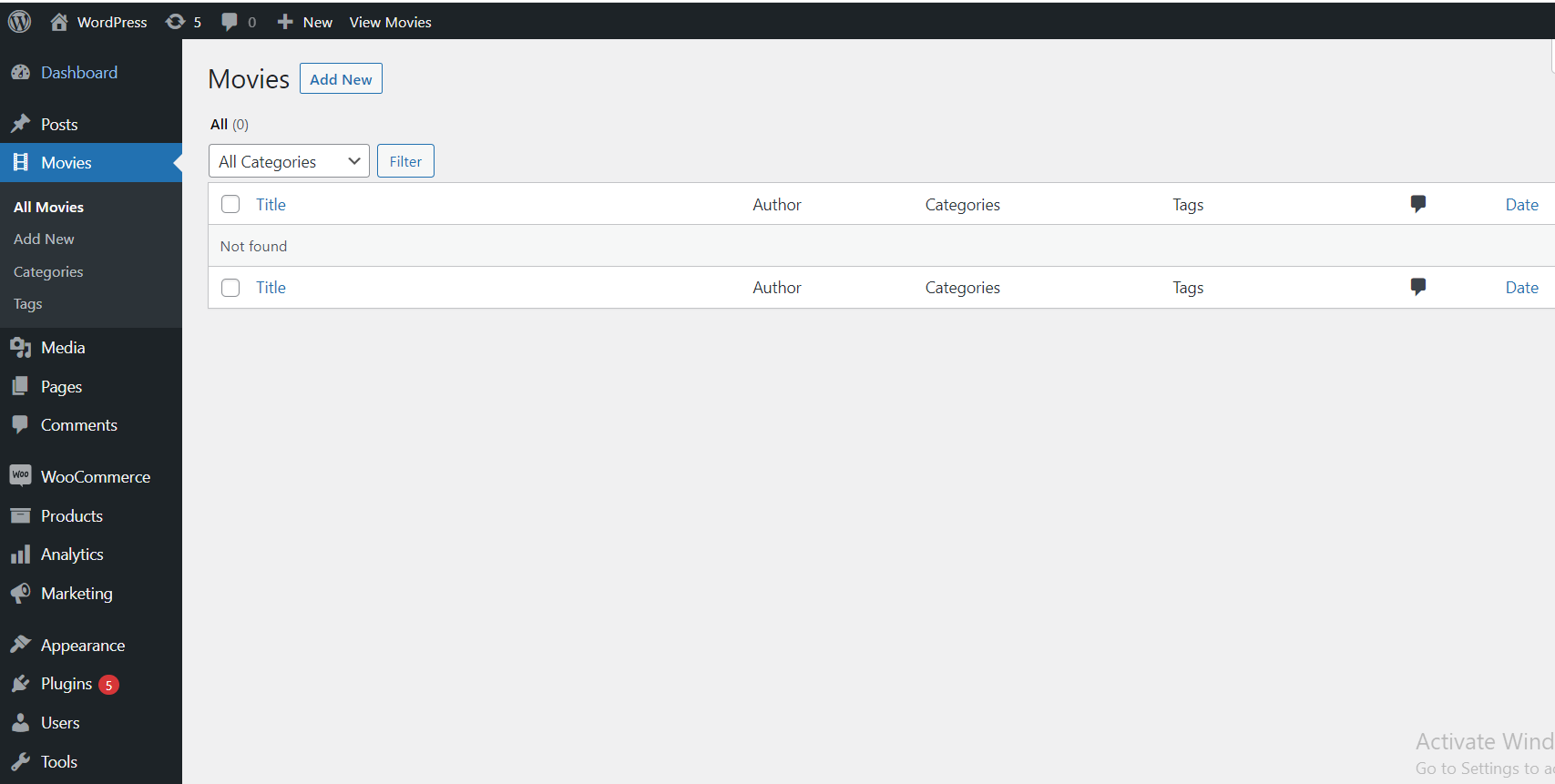
The Movie post type is now registered and ready to use. Add a few sample entries, then move on to displaying them on the front end below.
Displaying Movies on the Front End
A custom post type doesn’t automatically show up anywhere on the public site — you query it explicitly with WP_Query, the same way you would for regular posts:
$movies_query = new WP_Query( array(
    'post_type'      => 'movies',
    'posts_per_page' => 10,
) );

if ( $movies_query->have_posts() ) :
    while ( $movies_query->have_posts() ) : $movies_query->the_post();
        the_title( '
‘, ‘
‘ ); the_excerpt(); endwhile; endif; wp_reset_postdata();
For a version of this loop with proper pagination (needed the moment you have more movies than fit on one page), see our custom loop with pagination guide — the same WP_Query pattern applies directly to a custom post type.
Wrapping Up
You’ve now registered a custom post type, given it a dedicated taxonomy instead of piggybacking on the built-in blog category, made sure it works with the block editor and REST API via show_in_rest, and displayed it on the front end. If you’re planning to expose movie data to a JavaScript front end or mobile app rather than a PHP template, the same post type works directly with a custom REST API endpoint, and if editors will be adding rich, structured content to each movie entry, a custom Gutenberg block pairs naturally with a post type that has show_in_rest enabled.



One reply on “How to Create Custom Post Type in WordPress Without Any Plugin”
[…] convenience and speed. If you’re setting up custom tables anyway, it pairs naturally with a custom post type built without a plugin, since you get full control over both the schema and the query […]